


.gif)
পিরামিড :
এস. এম. রাকিবুল ইসলাম
পিরামিড :
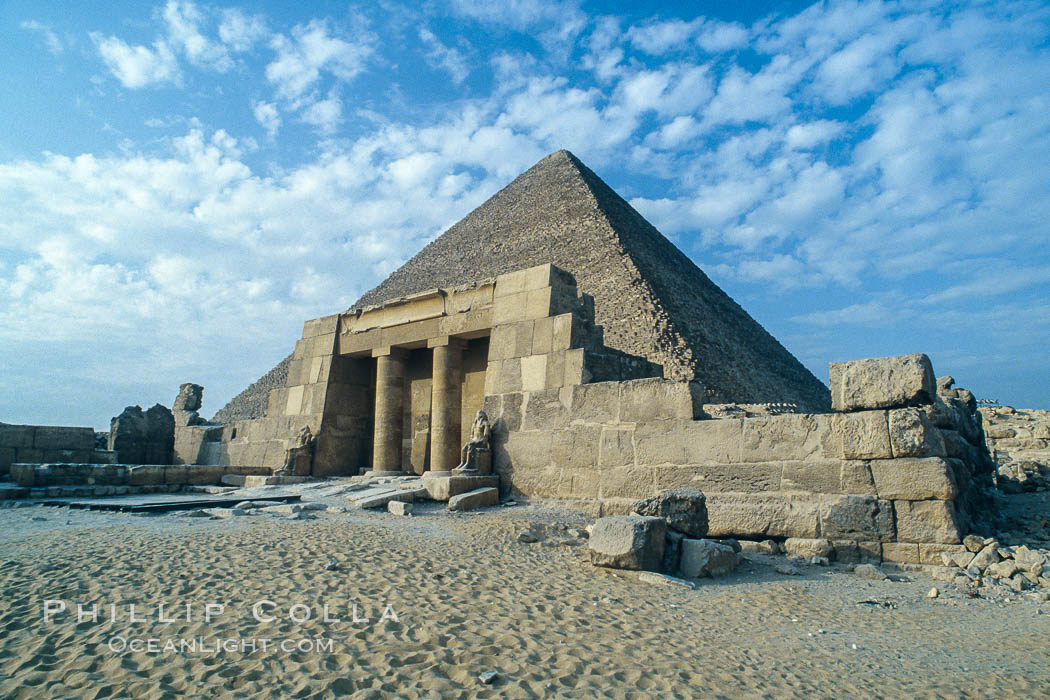
পিরামিড পৃথিবীর সপ্তম আশ্চর্যের একটি। প্রাচীন মিশর শাসন করতেন ফারাও রাজারা। তাদের কবরের উপর নির্মিত সমাধি মন্দিরগুলোই পিরামিড হিসেবে পরিচিতি লাভ করে। মিসরে ছোটবড় ৭৫টি পিরামিড আছে। সবচেয়ে বড় এবং আকর্ষনীয় হচ্ছে গিজা'র পিরামিড যা খুফু'র পিরামিড হিসেবেও পরিচিত। এটি তৈরি হয়েছিল খ্রিস্টপূর্ব প্রায় ৫০০০ বছর আগে।

 এর উচ্চতা প্রায় ৪৮১ ফুট। এটি ৭৫৫ বর্গফুট জমির উপর স্থাপিত। এটি তৈরি করতে সময় লেগেছিল ২০ বছর এবং শ্রমিক খেটেছিল ১ লাখ। পিরামিডটি তৈরি করা হয়েছিল বিশাল বিশাল পাথর খন্ড দিয়ে। পাথর খন্ডের এক একটির ওজন ছিল প্রায় ৬০ টন, আর দৈর্ঘ্য ছিল ৩০ থেকে ৪০ ফুটের মত। এগুলো সংগ্রহ করা হয়েছিল দূর দুরান্তের পাহাড় থেকে। পাথরের সাথে পাথর জোড়া দিয়ে এমনভাবে পিরামিড তৈরি করা হত যে, একটি পাথর থেকে আরেকটি পাথরের মাঝের অংশে একচুলও ফাঁক থাকত না।


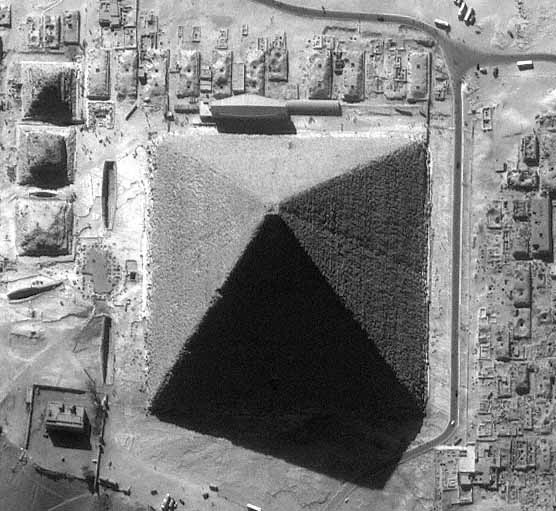

 পিরামিড নির্মানের সময় হয়ত এমন এমন এ ছিল :

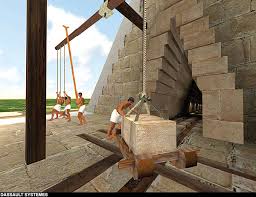
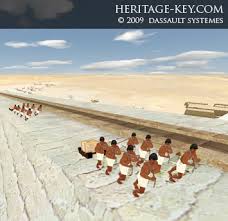

পিরামিডের মূল কাঠামো :


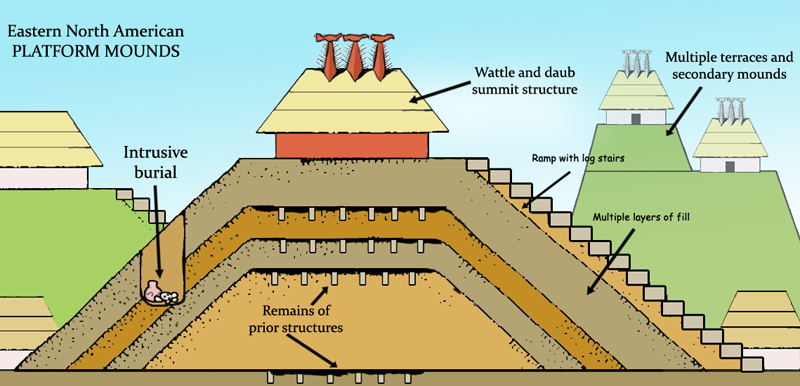


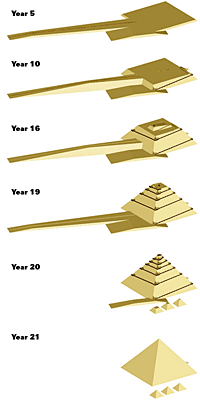
ফারাও:
প্রাচীন মিশরীয় রাজারা ফেরাউন 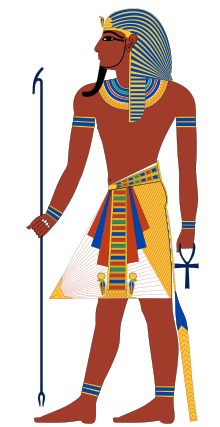 এরা নিজেদেরকে সূর্যের বংশধর মনে করত। নিজেদেরকে দেবতা বলে মনে করায় তারা বংশের বাইরে কাউকে বিবাহ করত না। ফলে ভাইবোনেদের মধ্যেই বিবাহ সম্পন্ন হত। ফেরাউনরা মৃত্যুর পরও জীবন আছে বলে বিশ্বাস করত। তাই তাদের মৃত্যুর পর পিরামিড বানিয়ে তার নীচে সমাধিকক্ষে এদের দৈনন্দিন জীবনের ভোগ-বাসনার সমস্ত সরঞ্জাম রক্ষিত করত। মৃতদেহকে পচন থেকে বাঁচাবার জন্য তারা দেহকে মমি বানিয়ে রাখত এবং স্বর্ণালঙ্কারে মুড়ে সমাধিকক্ষের শবাধারে রাখা হত।
মমি:
মমি হলো একটি মৃতদেহ যা জীবের শরীরের নরম কোষসমষ্টিকে জলবায়ু (বায়ুর অভাব অথবা অনাবৃষ্টি অথবা মৌসুমীয় অবস্থা) এবং ইচ্ছাকৃত কারণ (বিশেষ দাফন প্রথাগুলো) থেকে রহ্মা করে। অন্যভাবে বলা যায়, মমি হলো একটি মৃতদেহ যা মানবিক প্রযুক্তির মধ্যে অথবা প্রাকৃতিকভাবে ধ্বংস এবং হ্ময়প্রাপ্ত হওয়া থেকে রহ্মা করে।

মমি শব্দের উৎপত্তি:
মমি শব্দটি মধ্যে যুগের লাতিন শব্দ mumia থেকে এসেছে, একে পারস্য ফার্সি ভাষা mūm (موم) থেকে আনা হয়েছে যার অর্থ (bitumen)।


ভিতরে Khufu গ্রেট পিরামিড:
কেবল গ্রেট পিরামিড বেস উপরে একটি প্রবেশপথ থেকে, একটি আবদ্ধ আরোহী প্যাসেজ ৩৬ মিটার জন্য সিড়ি কঠিন একটা উঁচা গ্র্যান্ড গ্যালারি পাথর কোর মাধ্যমে. এই রাজা এর চেম্বার এবং এই বিশাল পিরামিড হৃদয় মধ্যে খালি ভাস্কর্যশিল্পঅলংকৃত শিলালিপিসমন্বিত প্রস্তর শবাধার পৌঁছানোর অন্য ৪৬ মিটার সিড়ি .


গ্রেট পিরামিড The King's Chamber হৃদয় রাজা এর চেম্বার একটি খালি পাথর ভাস্কর্যশিল্পঅলংকৃত শিলালিপিসমন্বিত প্রস্তর শবাধার ঝুলিতে.

পিরামিডের আলোক বিম্ভো :
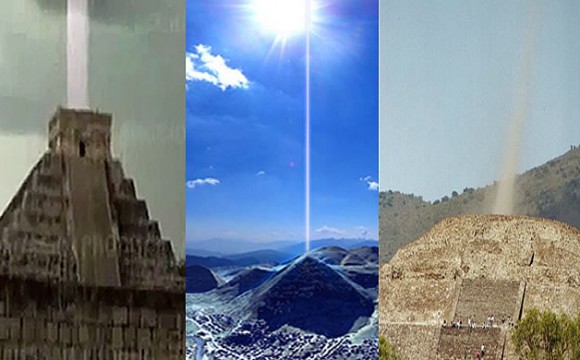
পদার্থবিদদের একটি টিম একটি শক্তি মরীচি বসনিয়ান পিরামিড সূর্যের উপরের মাধ্যমে সনাক্ত আসছে. মরীচি এর ব্যাসার্ধ হল 28 ২ kHz একটি ফ্রিকোয়েন্সি সঙ্গে 4.5 মিটার. মরীচি হয় ক্রমাগত এবং তার শক্তি বৃদ্ধি হিসাবে এটি পিরামিড থেকে চলে আপ এবং দূরে. এই ঘটনাটি ঔষধ প্রয়োগ করা এবং প্রযুক্তি পরিচিত আইন contradicts. মনে হচ্ছে যে পিরামিড-বিল্ডার একটি চিরস্থায়ী গতি মেশিন তৈরি একটি দীর্ঘ সময় আগে এবং এই "শক্তি মেশিন" এখনও কাজ করছে. মৌলিক পিরামিড, সবচেয়ে উচ্চতর এবং প্রাচীনতম, উন্নত বিল্ডার কে শক্তি, জ্যোতির্বিদ্যা এবং নির্মাণ ভালো জানত আমাদের তুলনায় যা আমরা দ্বারা করা হয় নি. পুরান চীনা এবং মিশরীয় পিরামিড আছে যারা তৈরি করে পরে অসফল হিসাবে, অনেক শ্রেয়. পুরাতন গ্রানাইট এবং বেলেপাথর ব্লকগুলো থেকে নির্মিত হবে, আরো বেশী সাম্প্রতিক অনেক ছোট ইট এবং কাদা থেকে নির্মিত.
এস. এম. রাকিবুল ইসলাম
How To Join Files
Very Easy To Join Files ,Again say very easy
HJSplit doesn't need to be installed. you can run it directly by clicking on Hjsplit.ext. Before you start, Remember that all the parts (.001, .002, .003, .004, etc ) have to be in the same folder, and they have to have the same name but has different extension (.001, .002, .003) or else it won't work.Make sure you have all the files to join. If one is missing, you will not be able to complete the process...

To join all the parts, open HJSplit and click on 'Join'. Click on Input File and choose the .001 file

I have a list of files with extensions avi.001, avi.002, avi.003 and that goes on to avi.008

The second wizard screen in the joining .001, .002, ... files is where you will point the input file for joining the file parts.
Note that, you will only select the file with extension .001 and the HJ-Split will automatically find the other parts (like .002, .003, .004) if they are in the same folder with .001 file.
After the input file is selected, HJSplit will display the output file, the joined file outcome of the software in the screen in output text area.
By clicking on the Output area, you can change the location of the output file if you want.

Click on the Start button to start joining process.

When the joining splitted files with extensions 001,002,003,....,008,etc finished the HJSplit software will inform you.

Click on the Close button to end the task of joinning spitted files 001,002,003 with HJSplit file splitting program.
I hope you liked HJSplit manual demonstrating how to join files HJSplit divived into parts in smaller sizes.
It is very easy and fast to use HJSplit to join files with 001 extension.
HTML Paragraphs
EXAMPLE:
Now we show diffrent type of paragraph:
In the previous code example:
<p > means start tag and </ p> end tag.
The <p> tag defines a paragraph
Left Text Paragraph:
Right Text Paragraph:
HTML Pragraph with space:
HTML Pragraph using line brake:
Now we show diffrent type of paragraph:
| HTML | Result |
|---|---|
<p>Avoid losing floppy disks with important school/work projects on them. Use the web to keep your content so you can access it from anywhere in the world. It's also a quick way to write reminders or notes to yourself. With</p>
<p>For instance, let's say you had a HUGE school or work project to complete. Off hand, the easiest way to transfer the documents from your house could be a 3.5" floppy disk. However, there is an </p>
|
Avoid
losing floppy disks with important school/work projects on them. Use the web to
keep your content so you can access it from anywhere in the world. It's also a
quick way to write reminders or notes to yourself. With simple html skills,
(the ones you have gained so far) it is easy.
For instance, let's say you had
a HUGE school or work project to complete. Off hand, the easiest way to
transfer the documents from your house could be a 3.5" floppy disk.
However, there is an alternative. Place your documents, photos, essays, or
videos onto your web server and access them from anywhere in the world.
|
In the previous code example:
<p > means start tag and </ p> end tag.
The <p> tag defines a paragraph
Left Text Paragraph:
Example:
HTML:
<html>
<body>
<p align="left">This is a paragraph.</p>
<p>This is a paragraph.</p>
<p>This is a paragraph.</p>
</body>
</html>
|
|---|
This is a paragraph
This is a paragraph |
Right Text Paragraph:
Example:
HTML:
<html>
<body>
<p align="right">This is a
paragraph.</p>
<p>This is a
paragraph.</p>
<p>This is a
paragraph.</p>
</body>
</html>
|
|---|
This is a paragraph
This is a paragraphThis is a paragraph |
Right Text Paragraph:
Example:
HTML:
<html>
<body>
<p align="center">This is a paragraph.</p>
<p>This is a paragraph.</p>
<p>This is a paragraph.</p>
</body>
</html>
|
|---|
This is a paragraph
This is a paragraphThis is a paragraph |
HTML Pragraph with space:
<html> <body> <p> This paragraph contains a lot of lines in the source code, but the browser ignores it. </p> <p> This paragraph contains a lot of spaces in the source code, but the browser ignores it. </p> <p> The number of lines in a paragraph depends on the size of your browser window. If you resize the browser window, the number of lines in this paragraph will change. </p> </body> </html> |
|---|
This paragraph contains a lot of lines in the source code, but the browser ignores it.
This paragraph contains a lot of spaces in the source code, but the browser ignores it.
The number of lines in a paragraph depends on the size of your browser window. If you resize the browser window, the number of lines in this paragraph will change.
|
HTML Pragraph using line brake:
<html> <body> <p>This is<br>a para<br>graph with line breaks</p> </body> </html> |
|---|
This is
a para
graph with line breaks
|
HTML Pragraph with Right an Image:
<P><IMG SRC="http://sphotos-f.ak.fbcdn.net/hphotos-ak-prn1/69264_470536069695150_203478043_n.jpg" height=62 width=87 ALIGN=RIGHT>This is how to put the image on the right side of the text. Just put the image code and the text without any brake tags or paragraph between them the tag of the image will put things the way you want it on the right side of the text.This is how to put the image on the right side of the text. Just put the image code and the text without any brake tags or paragraph between them the tag of the image will put things the way you want it on the right side of the text.</P>
|
|---|
 This is how to put the image on the right side of the text. Just put the image code and the text without any brake tags or paragraph between them the tag of the image will put things the way you want it on the right side of the text.RepeatThis is how to put the image on the right side of the text. Just put the image code and the text without any brake tags or paragraph between them the tag of the image will put things the way you want it on the right side of the text. This is how to put the image on the right side of the text. Just put the image code and the text without any brake tags or paragraph between them the tag of the image will put things the way you want it on the right side of the text.RepeatThis is how to put the image on the right side of the text. Just put the image code and the text without any brake tags or paragraph between them the tag of the image will put things the way you want it on the right side of the text. |
In the previous code example:
- < p> means start pragraph tag and </p > pragraph end tag.
- The text between <IMG SRC="http://sphotos-f.ak.fbcdn.net/hphotos-ak-prn1/69264_470536069695150_203478043_n.jpg" height=62 width=87 ALIGN=RIGHT> define image within this text.
- The text between ALIGN=RIGHT define image position.
HTML Pragraph with Right an Image:
<IMG SRC="http://sphotos-f.ak.fbcdn.net/hphotos-ak-prn1/69264_470536069695150_203478043_n.jpg" height=62 width=87 ALIGN=LEFT>This is how to put the image on the right side of the text. Just put the image code and the text without any brake tags or paragraph between them the tag of the image will put things the way you want it on the right side of the text.This is how to put the image on the right side of the text. Just put the image code and the text without any brake tags or paragraph between them the tag of the image will put things the way you want it on the right side of the text.
|
|---|
 <P><IMG SRC=""help2.gif" height=62 width=87 ALIGN=LEFT>This is how to put the image on the left side of the text. Just put the image code and the text without any brake tags or paragraph between them the tag of the image will put things the way you want it on the left side of the text..Repeat This is how to put the image on the left side of the text. Just put the image code and the text without any brake tags or paragraph between them the tag of the image will put things the way you want it on the left side of the text..</P> <P><IMG SRC=""help2.gif" height=62 width=87 ALIGN=LEFT>This is how to put the image on the left side of the text. Just put the image code and the text without any brake tags or paragraph between them the tag of the image will put things the way you want it on the left side of the text..Repeat This is how to put the image on the left side of the text. Just put the image code and the text without any brake tags or paragraph between them the tag of the image will put things the way you want it on the left side of the text..</P> |
n the previous code example:
- < p> means start pragraph tag and </p > pragraph end tag.
- The text between <IMG SRC=""help2.gif" height=62 width=87 ALIGN=LEFT>define image within this text.
- The text between ALIGN=LEFT define image position.
HTML Header Tag Or Headling
HTML Header Tag Or Headling:
There are six header tags:
- H1
- H2
- H3
- H4
- H5
- H6
| Firstname | Lastname |
|---|---|
<html>
<body>
<h1>This is heading 1</h1>
<h2>This is heading 2</h2>
<h3>This is heading 3</h3>
<h4>This is heading 4</h4>
<h5>This is heading 5</h5>
<h6>This is heading 6</h6>
</body>
</html> |
This is heading 1
This is heading 2
This is heading 3
This is heading 4
This is heading 5
|
In the previous code example:
- < > means start tag and </ > end tag.
- The text between <h1> and </h1> Fort Bold and size 24.
- The text between <h2> and </h2> Fort Bold and size 18.
- The text between <h3> and </h3> Fort Bold and size 13.5
- The text between <h4> and </h4> Fort Bold and size 13.5
- The text between <h5> and </h5> Fort Bold and size 10
- The text between <h6> and </h6> Fort Bold and size 7.
HTML INTRODUCTION
HTML INTRODUCTION:
| HTMl | RESULT |
|---|---|
| <html>
<body>
<h1>My Frist Head line</h1>
<p>My frist paragraph<p>
</body>
</html>
| My Frist Head lineMy frist paragraph |
In the previous code example:
- < > means start tag and </ > end tag.
- The text between <html> and </html> descrides the Web page.
- The text between <body> and </body> is the visible page count.
- The text between <h1> and </h1> is displayed as aheading.
- The text between <p> and </p> is displayed as a pragraph.
Subscribe to:
Posts (Atom)
Popular Posts
-
 Very Easy To Join Files ,Again say very easy First, you'll Have to Download HJSplit... You Can Download It Here : Click Here ...
 -
EXAMPLE: Now we show diffrent type of paragraph: HTML Result <p> Avoid losing floppy disks with important school/work project...
-
HTML Header Tag Or Headling: There are six header tags: H1 H2 H3 H4 H5 H6 Firstname Lastname <html> <body...
-
এস. এম. রাকিবুল ইসলাম পিরামিড : পিরামিড পৃথিবীর সপ্তম আশ্চর্যের একটি। প্রাচীন মিশর শাসন করতেন ফারাও রাজারা। তাদের কবরের উপর নির্...
-
HTML INTRODUCTION: HTMl RESULT <html> <body> <h1>My Frist Head line</h1> <p>My frist paragraph...


.gif)

